Global Search
The Global Search service provides full-text search capabilities on all entities, their associated history lines, and attachments.
It seamlessly integrates with an Elastic Search service hosted in your environment, provided the following requirements are met:
- A working Elastic Search service is available in your environment
- Currently, only version 1.7.x is supported
- Older or newer versions are not officially supported
- Currently, only version 1.7.x is supported
- Users are working with PROLIN Smart Client
Indexed Entities
Depending on your configuration, the following entities (including history lines and supported attachments) will be indexed:
- Service Requests (Service Calls)
- Problems
- Changes
- Incidents
- Work Orders
- Services
- Configuration Items
- E-mail Service Requests
Configuration
You can configure the Global Search service in the Services configuration section of the Server Management Console.
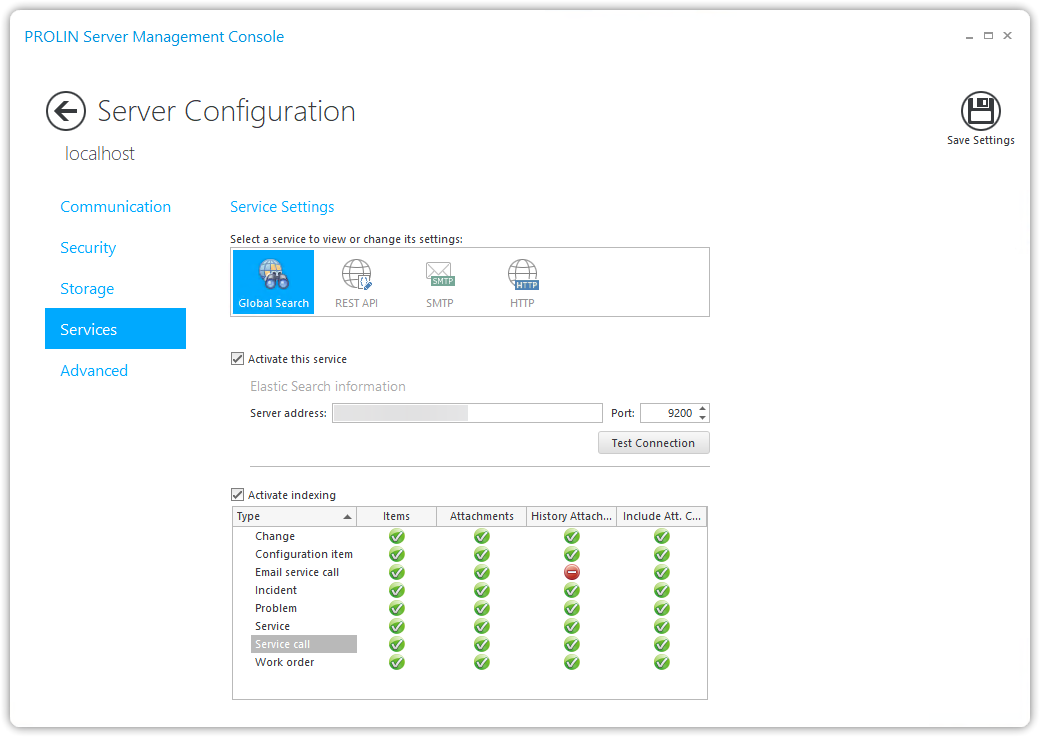
Available Settings
| Setting | Description |
|---|---|
| Activate this service | Enables the Global Search service on your PROLIN Power Server instance. By default, only full-text search is provided. At least one instance must have one or both of the Index settings enabled. When the instance starts, it automatically builds the index. You can monitor progress in the Services section of the Monitoring page. |
| Service address | The host address of the Elastic Search service in your environment. This is required when the Global Search service is activated. You can verify it by pressing the Test Connection button. |
| Port | The port of the Elastic Search service (default: 9200). |
| Index entities | Enables indexing of entities and their associated history lines. |
| Index attachments | Enables indexing of associated attachments. You can choose to include only the attachment name or both the name and content. |
NoteNote
If the Global Search service is activated but neither Index entities nor Index attachments are enabled, the index will not be built.
As a result, users will not be able to perform search operations.