Understanding the Information in a Form
PROLIN Smart Client forms are powerful tools for viewing detailed item information. To get a quick overview of an item’s content, focus on the following areas:
Display Fields
Display fields show related item information inline. For instance, a Service Call might show:
- The caller (Person)
- A history line
- Other related item details
These appear as read-only fields with a summary list beneath them. Scroll bars may be present if there are more lines than can be displayed at once.

Example: Caller display fields in a Service Call form.
Quickview Tooltip
The Quickview tooltip gives summary information for related items without consuming form space.
- Hover your mouse over a field (e.g., Caller, CI, etc.).
- A tooltip appears below the cursor with additional item information.
- This works even if display fields are not activated for that item.
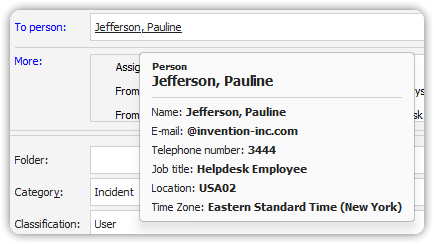
Useful for fast insights without navigating away from the current form.
These two features—Display Fields and Quickview Tooltips—enable efficient access to contextual data within the Smart Client.