Sending E-Mail Messages from Items
E-mail messages can be sent from many items in PROLIN Smart Client using a Smart Link. These Smart Links are accessible from the Actions group in the Home tab. The availability of the e-mail Smart Link depends on system configuration and must be enabled by the system administrator.
Common Use Cases
- Communicating with the Caller of a Service Call.
- Communicating with the Person assigned to a Work Order.
The content of the email message is determined by system configuration and may include information from the item (e.g., description, ID, status).
How to Send an E-Mail
Select an item in a view, or open the item from a view.
Go to the Actions group on the Home tab.
Click Links, then choose New Mail Message.
📧 The exact name of this Smart Link may vary depending on your system configuration.
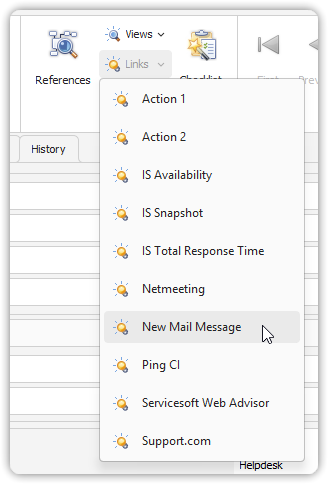
Send a New Mail Message
Notes
- The Netmeeting Smart Link works similarly to sending e-mail messages.
- Availability of these links depends on system configuration and permissions.