Add a Cross-Reference
This tutorial demonstrates how to add a cross-reference to your report. A cross-reference is a link that targets a location within the same document, allowing for easy navigation.
In this example, we’ll place a link at the bottom of each group that leads to the beginning of the report.
Steps to Add a Cross-Reference
1. Add a Target Label to the Top
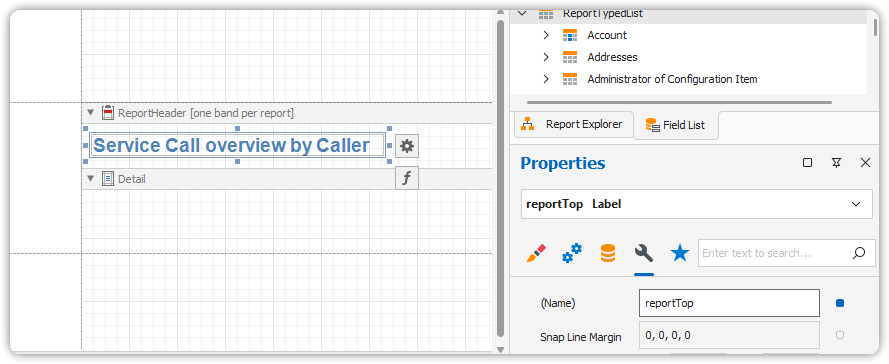
- Drop a Label into the ReportHeader band.
- Set its text (e.g., “Service Call Overview by Caller”).
- In the Property Grid, set its Name property to:
reportTop.
This label acts as the destination for your internal link.
3. Insert the Cross-Reference Link
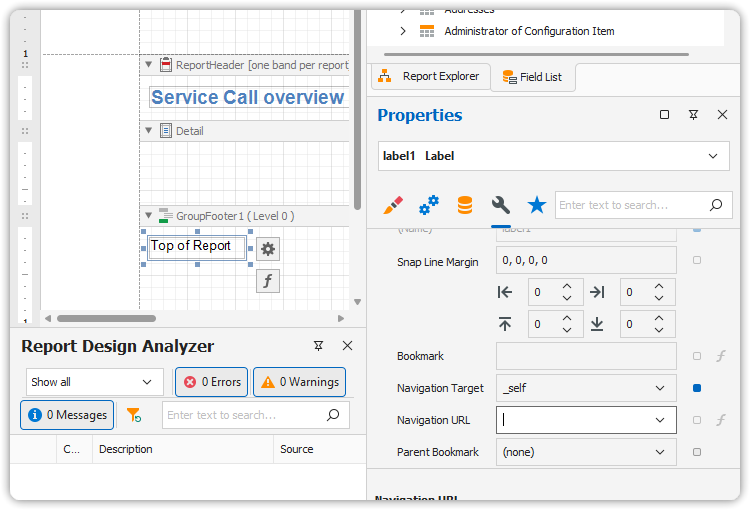
- Drop a Label into the GroupFooter band.
- Set its text to: Top of Report.
- Format it to look like a link (blue, underlined).
- Set
Navigation Targetto_self. - In the
Navigation URLdropdown, select reportTop.
4. Preview the Result
Switch to the Preview Tab or HTML View Tab to test the navigation.
Clicking Top of Report in the footer of each group will scroll back to the top label.