Exporting View Data
Views in PROLIN Smart Client provide a convenient overview of data that can be used for reports and presentations. You can export both table views and chart views into various file formats.
Export Formats
PROLIN Smart Client supports export to:
- PDF – Ideal for electronic document sharing
- Image formats – Such as JPG or PNG, perfect for embedding in presentations
- Other supported formats may vary by context
Steps to Export a View
- Open the desired table view or chart view
- Click the Export button on the Home tab of the ribbon
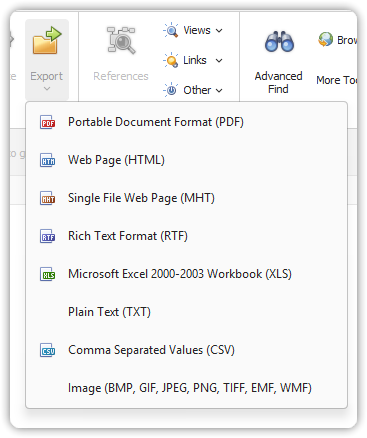
- Select the desired file format from the Export menu
- Depending on the format:
- A dialog will open for configuring export settings
- In the Save As dialog:
- Choose a location
- Enter a file name
- Click Save
📝 Tip: For visual formats (PDF, JPG, PNG), the view is captured as an image. Resize the view area within the console for a better fit in the final output document.
Use Cases
- PDF: Sharing a snapshot of a chart or table as a formal report
- Image files: Including visualizations in PowerPoint or Word documents