Required Fields
Some fields in a form may be required. A required field must contain a value before you can save or close the form.
Why Fields Are Required
- The value is essential for the process the item participates in.
- The value is necessary to establish or maintain relations with other items.
How to Recognize Required Fields
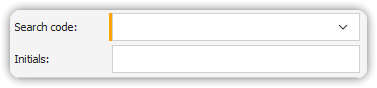
Required fields are visually indicated by:
- A thicker left-hand border on the field’s input box.
- This border is usually red, though the color can be customized in User Options.
Example:
Required Field with Indicator Bar
Customizing Appearance
To change the indicator color, see: Changing Appearance
(Refer to the relevant documentation or user options settings in PROLIN Smart Client.)