Master-Detail Report (Detail Report Bands)
This tutorial describes how to create a master-detail report—such as an invoice layout—by using Detail Report Bands and hierarchically linked data.
Step 1: Insert a Detail Report Band
To add a Detail Report Band:
- Right-click anywhere on the report surface.
- Choose:
Insert → Detail Report
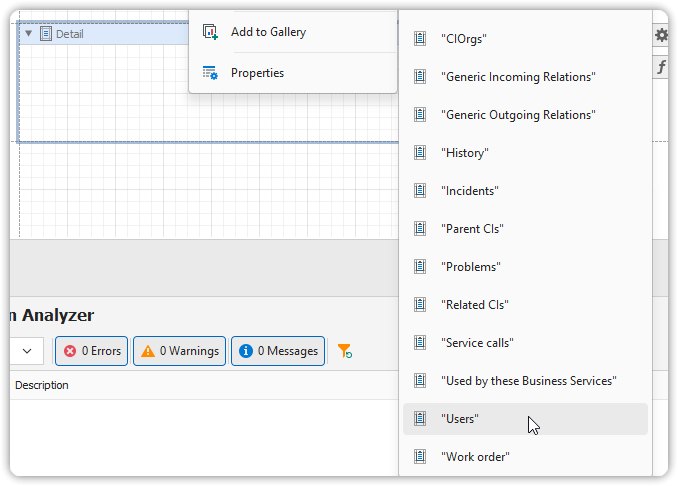
If the data source includes relationships, these will appear in the context menu for selection.
Step 2: Bind Data Fields
- From the Field List, drag the necessary fields into the Detail Report Band.
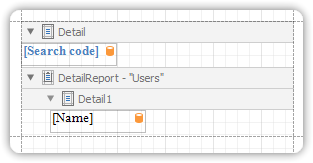
🔄 Make sure to drop fields from the relation node (e.g.,
Users)
so that the detail band links correctly to the master data.
View the Result
Switch to the Preview Tab to render the master-detail layout.
You should now see each master record (e.g., invoice, category) followed by its corresponding detail records (e.g., line items, products).
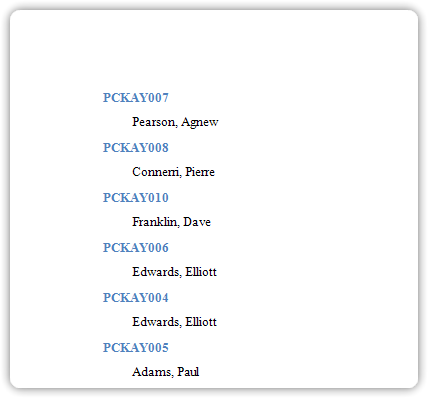
🎯 Use this pattern for invoices, order summaries, grouped reports, and other hierarchical data presentations.