Orphaned Attachment Cleanup tool
OACtool
version: 2024.10.6
date: February 2025
Introduction
The Orphaned Attachment Cleanup tool was created after it was discovered that attachments would not always get deleted from the attachment server when deleting the application item it was attached to.
Its initial purpose was to find files on the attachment server without an entry in the REP_ATTACHMENTS table and when instructed remove those orphaned files.
Added-on was a function to list Attachments (entries in REP_ATTACHMENT) without the physical file on the attachment server.
It now also detects empty files on the Attachment server, as well as Attachments that are missing a value in the Entity reference column, which results in an error when trying to open or save the attachment in Smart Client and the legacy client.
The program scans the Attachments table and the Attachment server and creates a local database.
At the end of the run it creates a text based report with the results.
The idea is to run the program twice. Once to create the database and the report. After verification the program can be run a second time to remove the orphaned attachments.
Prerequisites
Database access
The oactool needs to be able to connect to the application database with read privileges. It also needs to be able to connect to the Attachment server. The Attachment server details are retrieved from the application database.
ODBC
The program needs an ODBC data source definition to connect to the application database.
The data source definition needs to use a 64-bit ODBC driver, because the oactool.exe is a 64-bit executable.
The ODBC driver installation and ODBC data source configuration are described separately in the ODBC configuration how-to article.
Installation
The oactool is distributed as a ZIP file.
The default location to unzip into is the C:\Program Files\PROLIN\Integration Server folder.
The result would look like this.
C:\Program Files\PROLIN\Integration Server
  |____oactool\
  |       |____lib\
  |       |      |____*
  |       |____wsw\
  |       |      |____oactool-service.exe
  |       |      |____oactool-service.exe.config
  |       |      |____oactool-service.xml
  |       |____oactool.exe
  |       |____oactool.py.config.dist
  |       |____frozen_application_license.txt
  |       |____python3.dll
  |       |____python312.dll
Setup steps
You might need Administrator privileges to extract the software to the program files folder, set permissions on and edit configuration files.
If you have not already done so, please extract the files in the ZIP folder to your preferred destination.
Then open an elevated command line and navigate to said destination.
cd C:\Program Files\PROLIN\Integration Server\oactoolRun the program to verify the version.
oactool --versionPROLIN Smart Integration Server - oactool
(build - 2024.10.5)
(C)2019+ PROLINTo see usage and options, use the --help parameter.
oactool --helpusage: oactool [-h] [--create-directories] [--version] [--configfile CONFIGFILE] [--logfile LOGFILE]
[--loglevel LOGLEVEL] [--logstyle LOGSTYLE] [--print-named-configs] [--print-configdb-content]
[--manage-config] [--named-config NAMED_CONFIG] [--test-connection] [--remove-orphans]
[--keep-database]
PROLIN Smart Integration Server - oactool
options:
-h, --help show this help message and exit
--create-directories create directories if needed
--version print version info and exit
--configfile CONFIGFILE
use (alternate) configuration file
--logfile LOGFILE set log file name
--loglevel LOGLEVEL set loglevel [DEBUG, INFO, WARNING, ERROR, CRITICAL]
--logstyle LOGSTYLE set logstyle [FILE, STREAM, TIMEROTATING, SIZEROTATING]
--print-named-configs
print named configs (stored in local config database)
--print-configdb-content
print content of local config database
--manage-config create/update named config and store in local database
--named-config NAMED_CONFIG
use named config (stored in local database)
--test-connection test connection to SmartSuite database
--remove-orphans remove orphaned files from attachment server
--keep-database keep database instead of creating a new database and gather file and attachment information.The program expects, but not requires, a configuration file, i.e. oactool.py.config, in the same directory as the exe file. The distribution contains configuration files with an additional .dist suffix that can be used to create a configuration file. If you want to change the program’s defaults you can also use command line parameters and/or environment variables. Environment variables take precedence over default values and configuration settings in a configuration file. Command line parameters in turn take precedence over environment variables.
Note
When the software has been upgraded, the distributed configuration files might have changed. Please compare with the active configuration file(s) to see if any changes are required.
When you run the program for the first time, or without a configuration file, it will likely complain…
oactoolconfig file "C:\Program Files\PROLIN\Integration Server\oactool\oactool.py.config" does not exist
expected directory "F:\temp\SISpy\adm\oactool\config" does not exist
expected directory "F:\temp\SISpy\work\oactool" does not exist
An error occurred.
Expected directories do not exist, please check settings
usage: oactool [-h] [--create-directories] [--version] [--configfile CONFIGFILE] [--logfile LOGFILE]
[--loglevel LOGLEVEL] [--logstyle LOGSTYLE] [--print-named-configs] [--print-configdb-content]
[--manage-config] [--named-config NAMED_CONFIG] [--test-connection] [--remove-orphans]
[--keep-database]You will notice that the program requires a specific set of folders, hence the error messages.
It is highly unlikely that these folders exist in the default location when this is a greenfield installation. You will need to verify that the folders - all starting with drive F: - are acceptable.
If not, adjust the setting for these folders in the configuration file, and uncomment the line by removing the # at the beginning.
It is recommended to select a location outside the Program Files folder.
You then need to run the program again.
This time with the --create-directories parameter to instruct the program to create the folders it needs.
Once the folders are created successfully the server will prompt for additional values for the default config.
These settings are stored in a configuration database and any account credentials are stored encrypted.
oactool --create-directoriescreated C:\temp\SISpy\adm\oactool\config
schema has no programs table - programs
schema has no programs table - programs
Configuration Steps - section: Smart Suite Database
Database ('mssql', 'oracle11g', 'oracle12c', 'oracle18c', 'oracle19c') [mssql]:
Database ODBC DSN [servicedesk]: smartsuite
Use Windows Authentication  ('Yes', 'yes', 'No', 'no') [No]:
Database Username (read access) [sdread]: servicedesk
Database Password:
Repeat please:
Configuration "default" saved. Please restartNote
For Database ODBC DSN use the name of the data source created earlier.
Note
When entering or confirming the password, the input is not shown.
Manage Configuration
If you need to change the configuration settings, you need to re-run the program configuration. Assuming the default configuration, use the --manage-config parameter and complete the dialog.
oactool --manage-configConfiguration Steps - section: Smart Suite Database
Database ('mssql', 'oracle11g', 'oracle12c', 'oracle18c', 'oracle19c') [mssql]:
Database ODBC DSN [servicedesk]: smartsuite
Use Windows Authentication ('Yes', 'yes', 'No', 'no') [No]:
Database Username (read access) [sdread]: servicedesk
Database Password:
Repeat please:
Configuration "default" saved. Please restartTest Database Connection
If you want to test the connection to the database, use the --test-connection parameter.
oactool --test-connectionConnected to the Smart Suite Database
SD version: 4.5.0588.3901
General Settings Notification:
Nobody expects ....
the SPANish INQuisitionRunning the Orphaned Attachment Cleanup tool
With the configuration in place, running the program to create a report is simple.
oactool2024-11-08 11:37:22,622 INFO oac.processing.entry_point: started
2024-11-08 11:37:22,638 INFO oac.database.open_smartsuite_database: connected to database - version 4.5.0588.3901
2024-11-08 11:37:24,872 INFO oac.database.create_oactool_database: schema created
2024-11-08 11:37:24,888 INFO oac.processing.entry_point: cutoff at 20241108203724 from 2024-11-08 20:37:24.888544+01:00
2024-11-08 11:37:24,888 INFO oac.database.process_attachments: started
2024-11-08 11:37:24,904 INFO oac.database.process_attachments: retrieved 31 attachments
2024-11-08 11:37:24,904 INFO oac.database.process_attachments: finished
2024-11-08 11:37:24,904 INFO oac.oacftp.process_target_folder: started
2024-11-08 11:37:27,044 INFO oac.oacftp.process_entity_folder: processing folder "//EmailSC" - entity "E-mail Service Call"
2024-11-08 11:37:29,341 INFO oac.oacftp.process_entity_folder: processing folder "//HistoryLineIncident" - entity "History line Incident"
2024-11-08 11:37:31,669 INFO oac.oacftp.process_entity_folder: processing folder "//HistoryLineServicecall" - entity "History line Service call"
2024-11-08 11:37:34,638 INFO oac.oacftp.process_entity_folder: processing folder "//Incident" - entity "Incident"
2024-11-08 11:37:37,107 INFO oac.oacftp.process_entity_folder: processing folder "//Servicecall" - entity "Service call"
2024-11-08 11:37:39,669 INFO oac.oacftp.process_target_folder: finished
2024-11-08 11:37:39,700 INFO oac.processing.entry_point: Writing results to: C:\temp\SISpy\work\oactool\oactool.20241108193722.txt
2024-11-08 11:37:39,700 INFO oac.database.attachments_without_entities: Found: 0
2024-11-08 11:37:39,700 INFO oac.database.attachments_without_files: Found: 0
2024-11-08 11:37:39,700 INFO oac.database.files_without_attachments: Found: 0
2024-11-08 11:37:39,716 INFO oac.database.empty_attachments: Found: 0
2024-11-08 11:37:39,716 INFO oac.processing.entry_point: finishedThe report can be found in the work folder, in this case C:\temp\SISpy\work\oactool.
The name includes a datetime stamp in format YYYYMMDDhhmmss.
The logging shows that there is a cutoff, attachment uploaded after the cutoff datetime are not taken into account, and that the REP_ATTACHMENT table had 31 entries. It also shows the entity folders it finds on the Attachment server. The discovered information from the attachments and files are stored and processed. The results are written in the report, with a summary in the logging output.
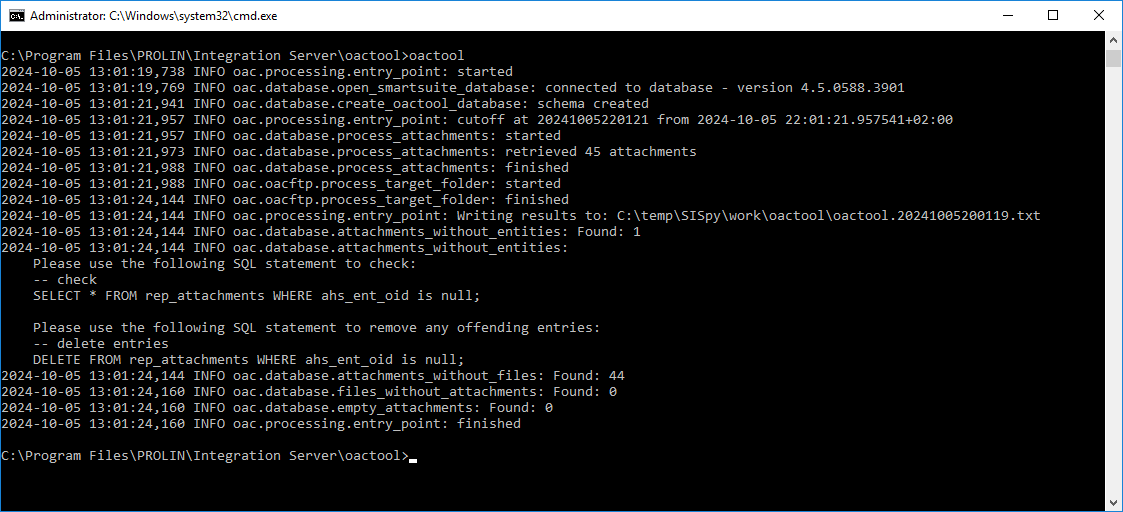
Orphaned Attachments Cleanup
After the diagnostics run, and review of the report, one can proceed to remove the orphaned attachments. The orphaned attachments are files on the attachment server without an entry in the REP_ATTACHMENTS table. The When the Smart Suite application has been running for a while, gathering the details from the attachment server might take a while. Removing files from the attachment server will take time as well.
The --keep-database parameter instructs the program to skip the discovery phase and use the database it created in the previous run.
You would use the parameter in combination with the --remove-orphans parameter to speed up the removal process.
oactool --keep-database --remove-orphans2024-11-08 12:55:29,821 INFO oac.processing.entry_point: started
2024-11-08 12:55:29,836 INFO oac.database.open_smartsuite_database: connected to database - version 4.5.0588.3901
2024-11-08 12:55:31,930 INFO oac.processing.entry_point: Writing results to: C:\temp\SISpy\work\oactool\oactool.20241108205529.txt
2024-11-08 12:55:31,930 INFO oac.database.attachments_without_entities: Found: 0
2024-11-08 12:55:31,930 INFO oac.database.attachments_without_files: Found: 0
2024-11-08 12:55:31,946 INFO oac.database.files_without_attachments: Found: 0
2024-11-08 12:55:31,946 INFO oac.database.empty_attachments: Found: 0
2024-11-08 12:55:31,946 INFO oac.database.remove_orphans: Total Removed: 0
2024-11-08 12:55:31,946 INFO oac.database.remove_orphans: Total not found/not removed: 0
2024-11-08 12:55:31,946 INFO oac.processing.entry_point: finishedNote
In the Administration console in the client, the Attachment management has a feature to remove Attachments without a corresponding file on the Attachment server. There is no function available to remove Attachments without an Entity reference or empty attachment files.