SMTP Service
SMTP Service
The SMTP service of PROLIN Power Server provides inbound e-mail handling capabilities based on the Simple Mail Transfer Protocol (SMTP).
Configuration
- The SMTP service is disabled by default.
- It can be enabled from the Services configuration section in the Server Management Console.
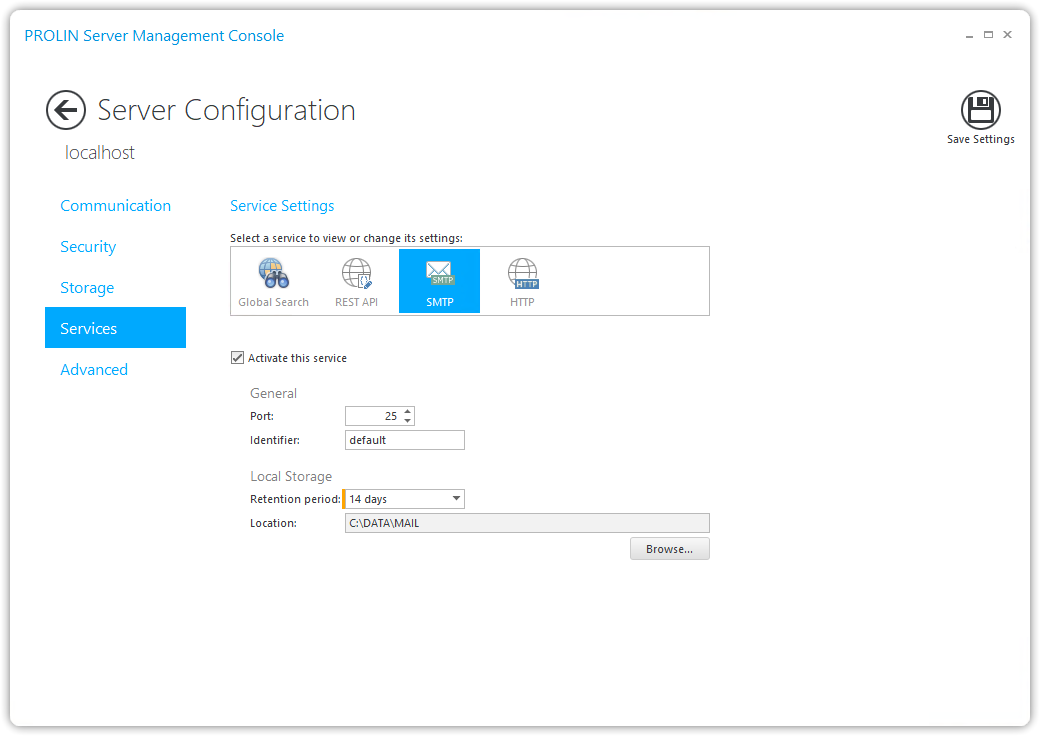
After activation, saving your settings, and restarting the server, the SMTP service endpoint will be available at:
smtp://<server>:<port>General Settings
| Setting | Description |
|---|---|
| Port | The port under which the service runs. Default: 25. |
| Identifier | Used to identify the service instance. |
| Local Storage Retention Period | Defines how long inbound e-mail messages are retained after being processed. - Default: 14 days - (None) → Messages are never retained - (Infinite) → Messages are retained indefinitely Note: This does not affect messages awaiting processing or those that failed processing. |
| Location | Directory where inbound e-mail messages are stored. Default: <installdir>\data\mail. When the service starts, the following subdirectories are created: |
Storage Subdirectories
- Inbox → Contains all inbound e-mail messages awaiting processing.
- Processed → Contains messages successfully processed by the system.
- The Retention Period applies to this folder only.
- The Retention Period applies to this folder only.
- Failed → Contains messages for which processing failed.
- Preserved for diagnostic reasons.
- You can replay processing by moving a file from this folder back into the Inbox.
- WarningRecommendation
Monitor this folder regularly to mitigate the risk of message loss.
- Preserved for diagnostic reasons.
- Temp → Temporary storage for attachments of inbound e-mail messages while they are being processed.
- Under normal circumstances, files in this folder are removed automatically after processing.